# Sign In
* [Web3 Wallet](/sign-in/web3-wallet)
* [Social Wallet](/sign-in/social-wallet)
# Web3 Wallet
At present, Petra and Nightly wallets are supported on the platform.
## How to Connect
1. Click "Sign In" button towards top right.
2. Select your preferred web3 wallet and click on "Connect" button
3. Log in to your wallet, if not already logged in and you are now signed in to Fliq.
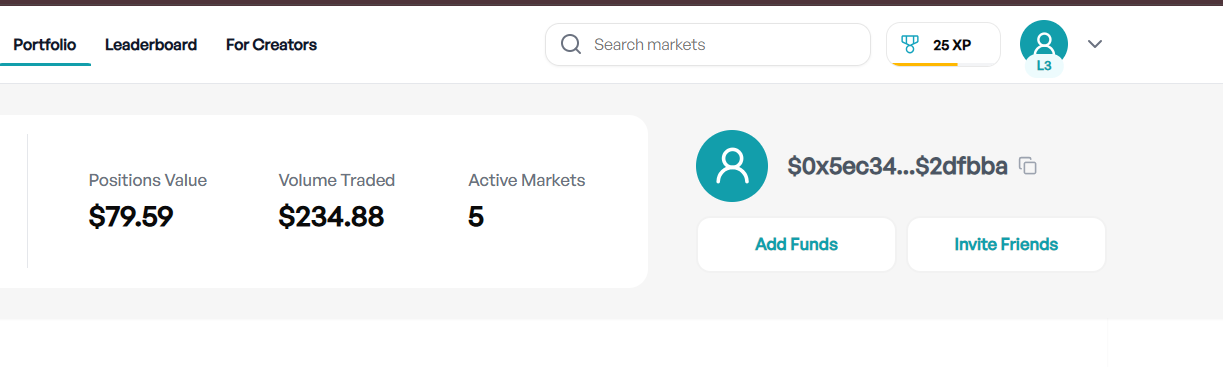
4. Go to Portfolio section in the navbar and click "Add Funds" to add testnet USDC to your wallet and start trading. \
# Social Wallet
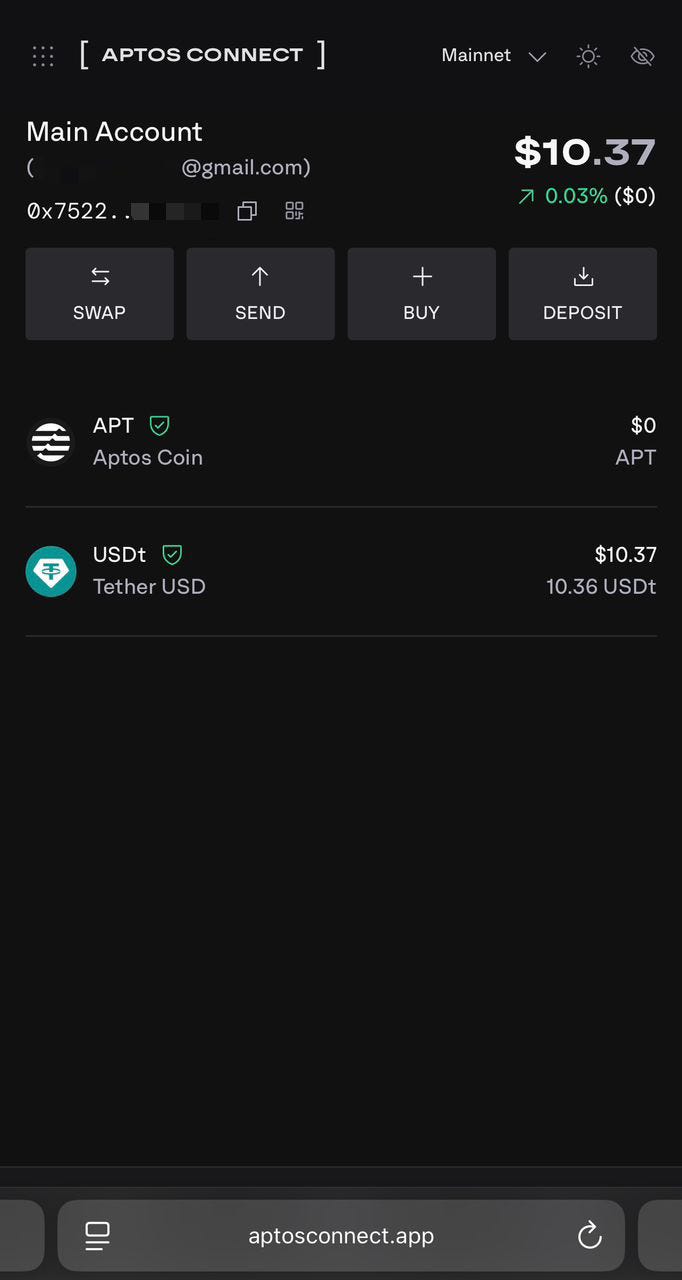
For social wallets, we support sign in via the Google account or the Apple account. It is being facilitated by [Aptos Connect](https://aptosconnect.app/).
## How to Connect
1. Click "Sign In" button towards top right.
2. Click on your preferred social account
3. Log in to your social account, if not already logged in and you are now signed in to Fliq.
4. Go to Portfolio section in the navbar and click "Add Funds" to add testnet USDC to your wallet and start trading.
# Markets
* [Market Creation](/markets/market-creation)
* [Market Resolution](/markets/market-resolution)
* [Market Odds](/markets/market-odds)
# Market Creation
Fliq allows anyone to create a market and specify the sources of truth for the resolution of that market. Creators even earn a share of protocol revenue generated from their markets.
## How to create my own market
1. Visit [market creation ](https://www.fliq.one/#/create)page.
2. Enter the question text, sources of truth, detailed rules for its resolution, end time, category and communication details which helps us get in touch with you if the question needs any kind of revision/edits.
3. Submit the details. Congratulations, your market is now live. View it on [creator rewards](https://www.fliq.one/#/creator-rewards) page.
## Market Review Process
Although the market is live and the trading can start immediately, this market will not appear on our [markets](https://www.fliq.one/#/) page yet. It will appear on markets page only after the market has been reviewed and approved.
### Criteria for Approval/Rejection
1. The market should be non ambiguous (objectively). The detailed rules should cover all cases to prevent any sort of disputes later. Subjective markets like "Will US be in recession before end of the year?" will be rejected.
2. The market should not be a duplicate of the existing markets.
3. The market should not come under the category of NSFW.
# Market Resolution
Market resolution at the moment is manual, using the source of truth provided by the market creator. We plan to decentralise market resolution and add dispute mechanisms in the near future.
# Market Odds
## Price vs Probability
The price of a share equals the probability of the market resolving to this outcome. If Yes shares in a market are trading at 45c, it simply means the market participants currently believe there is 45% probability of market being resolved to Yes and 55% chance for the market to be resolved to No.
{% hint style="info" %}
The prices of the Yes and No tokens may not exactly sum to one because of the bid-ask spread.
{% endhint %}
# How to Fund Your Fliq Account with Aptos USDT using Naira
Funding your Fliq account is simple, fast, and secure and because Fliq runs on the Aptos blockchain, you’ll need Aptos USDT (USDT on the Aptos network).\
\
Pls check this video tutorial :
Once funded, you can start trading right away either from your connected wallet or by using your Fliq generated Smart Wallet.
**Understanding Aptos USDT**
USDT (Tether) is a stablecoin pegged to the US dollar, meaning 1 USDT ≈ 1 USD.
Why Aptos USDT is used on Fliq:
* Stable value, avoiding wild crypto price swings.
* Fast transactions on the Aptos network.
* Low fees compared to other chains.
#### Where to Get Aptos USDT
If you don’t already have Aptos USDT, here are two common options to get:
#### 1. Using a Crypto Exchange
You can buy Aptos USDT from major exchanges such as Coinbase, Binance, or Bybit, then withdraw it to your Aptos wallet.
**Example: Buying USDT on Bybit**
1. Download the Bybit app from the App Store or Google Play.
2. Create an account and complete verification (KYC).
3. You can buy USDT in three ways:
* Debit/Credit Card — Pay directly with your card.
* Trade Crypto to USDT — Swap another cryptocurrency you already hold.
* P2P Exchange — Often cheaper since you buy directly from another person using your local currency.
**Buying USDT via P2P Bank Transfer (Cheaper Option)**
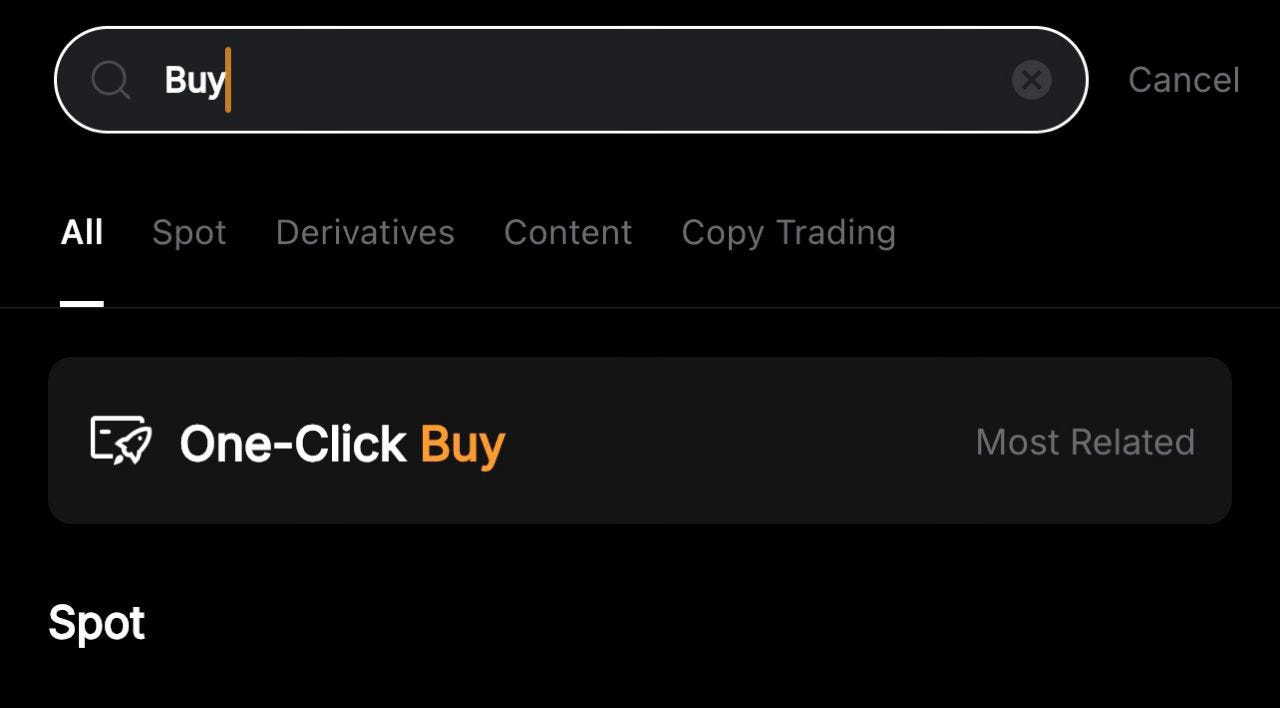
1. In the Bybit search bar, type “Buy” and select One-Click Buy option.
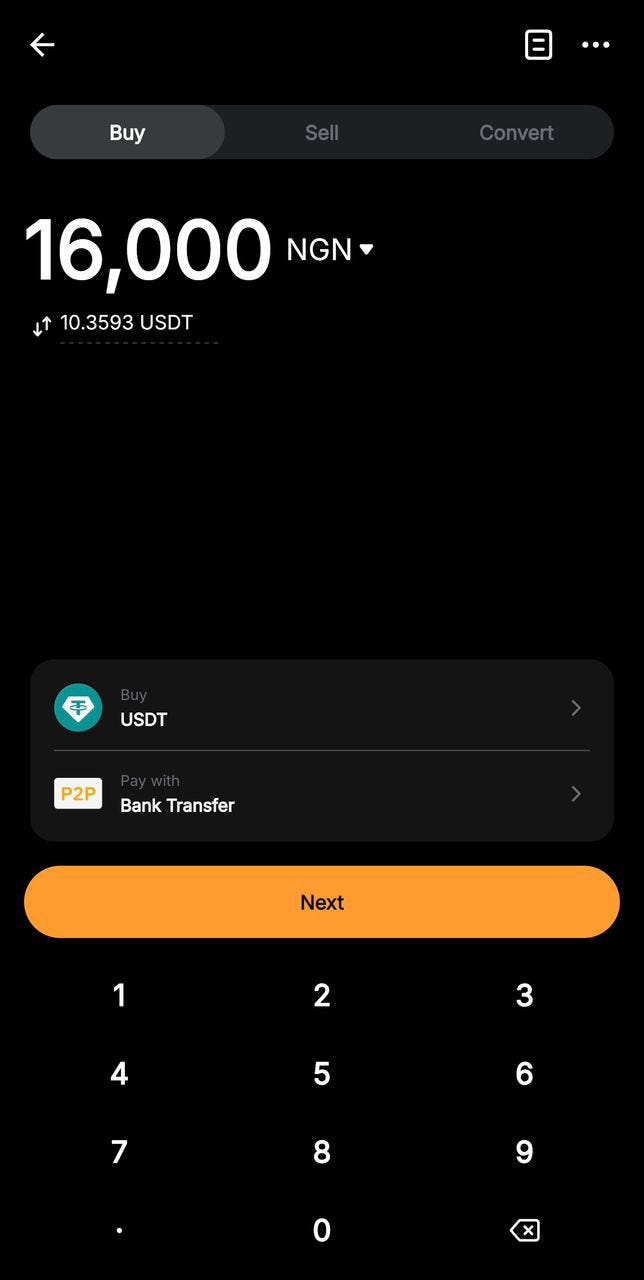
1. Choose USDT as the asset you want to buy.
2. Select P2P Bank Transfer as your payment method.
3. Enter the amount of USDT you want to purchase, then click Continue.
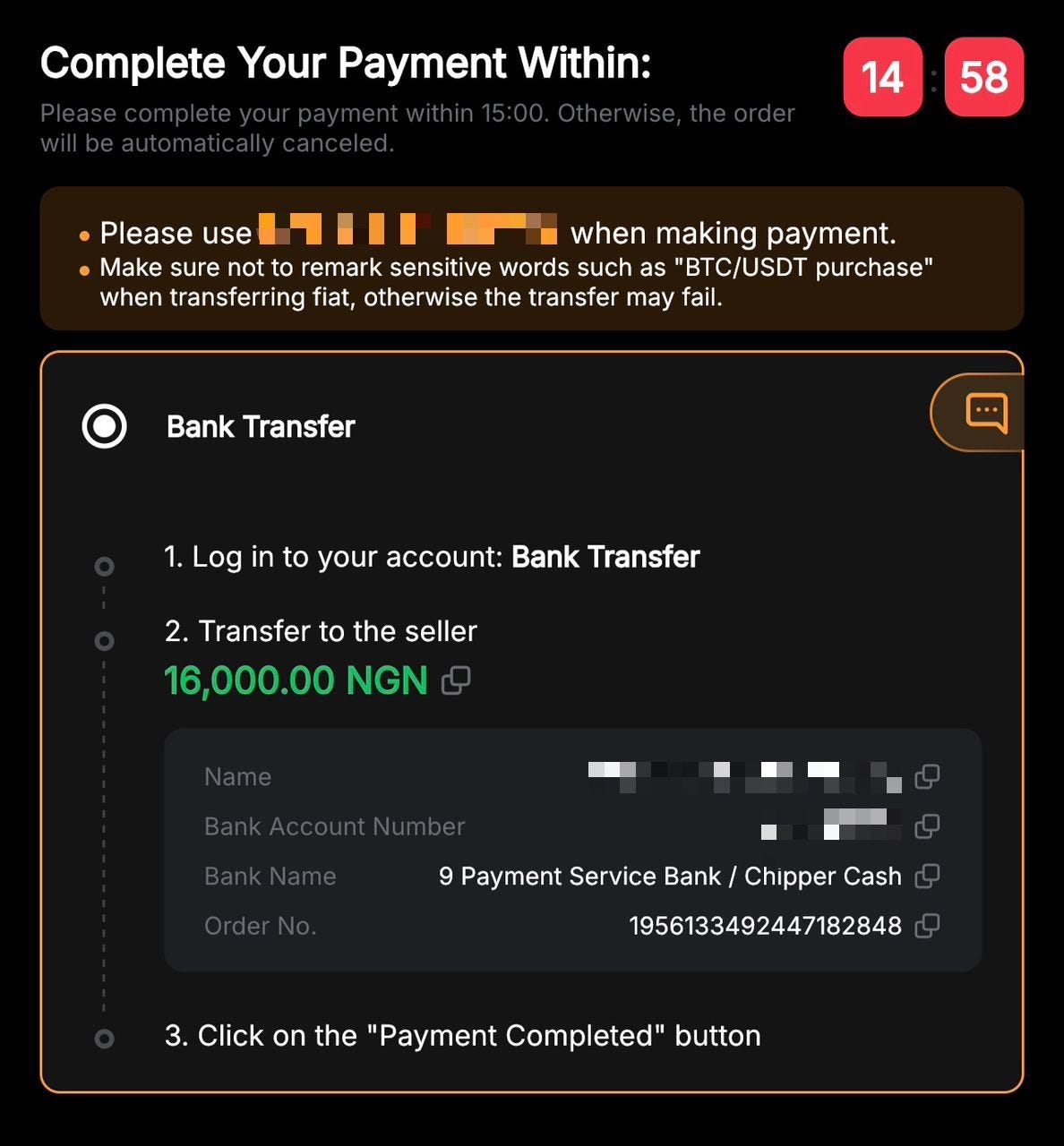
1. You’ll be taken to the payment page, where you’ll see the seller’s bank account details.
1. Read the instructions carefully, then:
* Ensure the name and bank details match exactly before making payment.
* Make the transfer from your bank app or online banking.
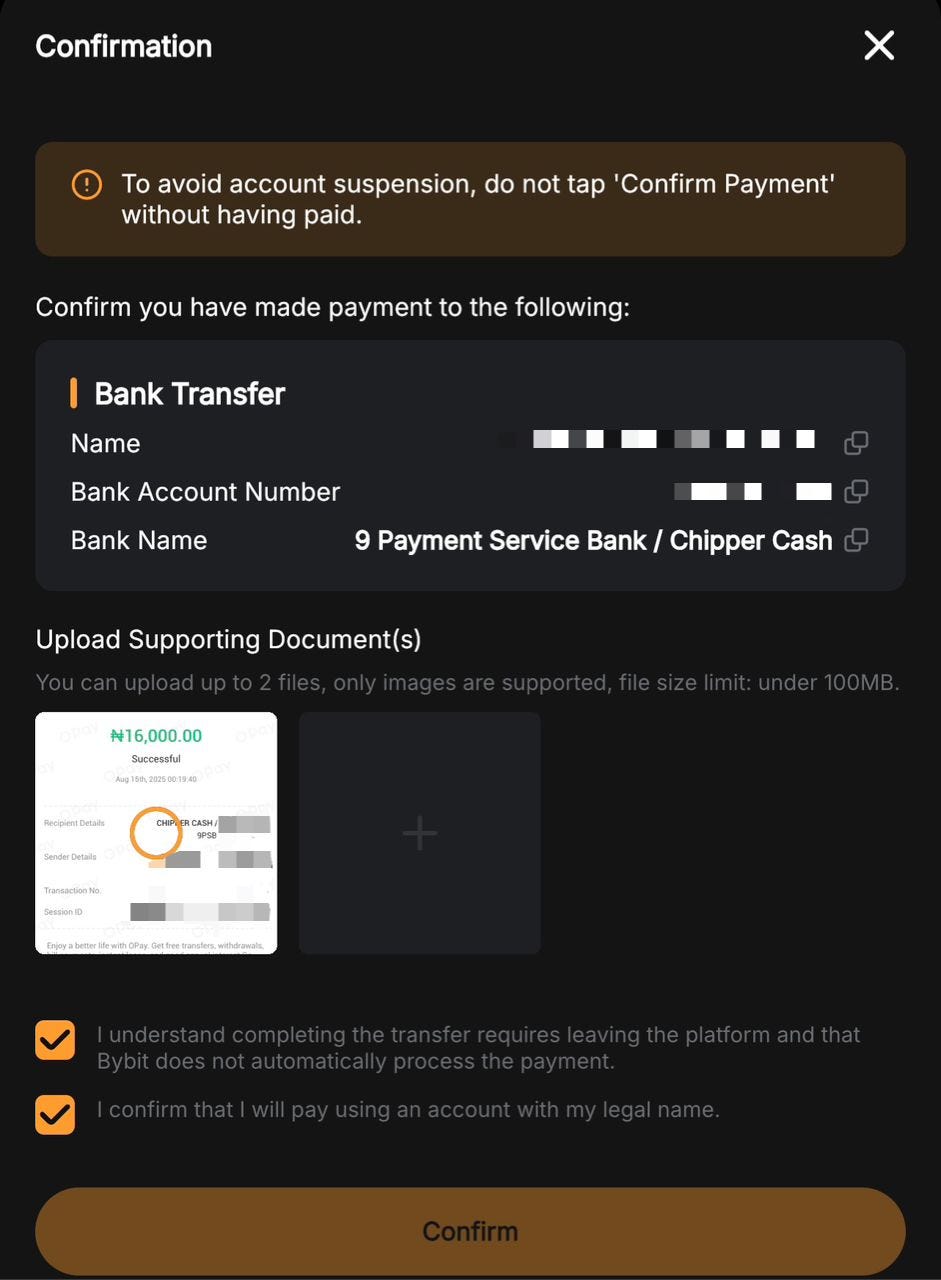
* Save the payment receipt — you will need to upload it as proof of payment in the Bybit app.
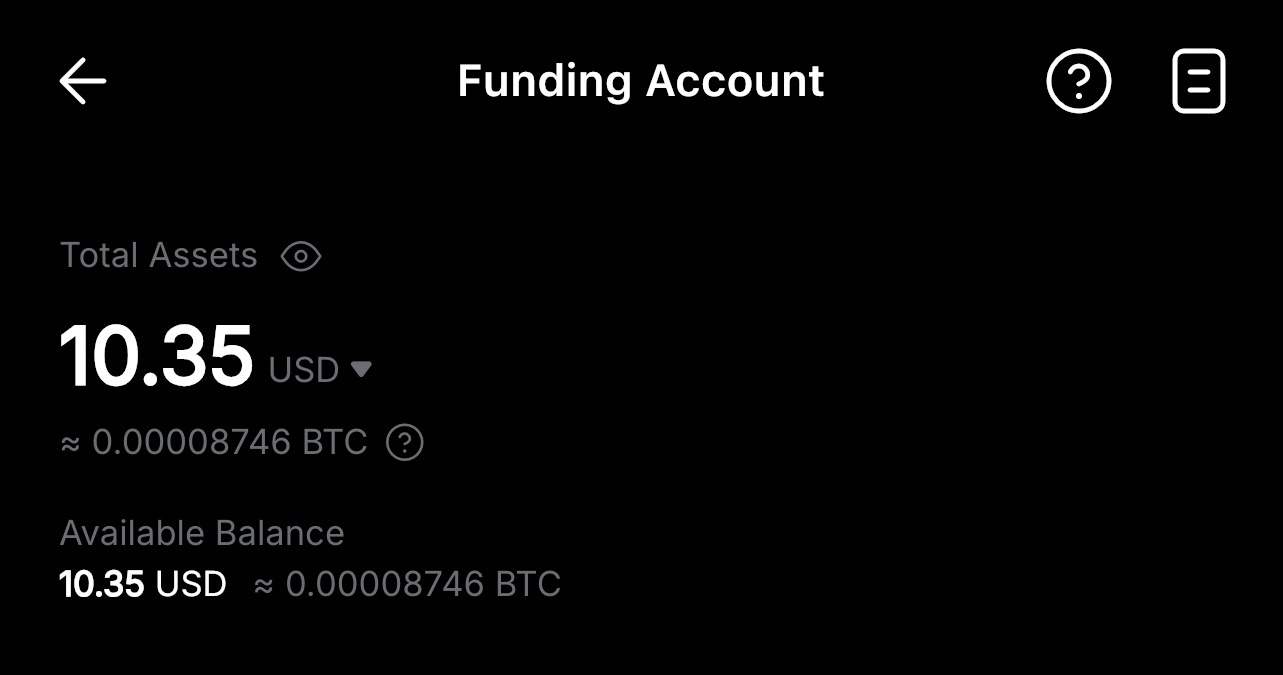
1. Once uploaded and confirmed by the seller, your USDT will appear in your Bybit wallet.
1. Send USDT to your Aptos wallet address:
* Network: Aptos
* Address: Your connected wallet (Petra or Aptos connect (google wallet) etc.).
[Learn more](https://www.bybit.com/en/learn/crypto/buy-tether) about how to buy Tether (USDT) on ByBit.
#### 2. Swapping from Your Aptos Wallet
If you already have APT or another token in your Aptos wallet, you can swap it directly to Aptos USDT without using an exchange.
Most Aptos wallets — like Aptos Connect or Petra Wallet — have a built-in Swap feature:
1. Open your wallet app.
2. Select Swap from the menu.
3. Choose the token you want to swap from (e.g., APT) and select USDT as the token to swap to.
4. Review the quoted rate and network fee, then confirm the swap.
5. Your new Aptos USDT balance will appear instantly in your wallet, ready to connect to Fliq.
💡 Tip: On-chain swapping is quick and avoids withdrawals from exchanges — perfect if you already hold APT or other Aptos assets.
**How to Deposit to Fliq Account**
You can fund Fliq in two ways — either by using your connected wallet or by depositing into your Fliq Smart Wallet.
#### Option 1 — Use Your Connected Wallet
1. Deposit Aptos USDT into your connected wallet (Petra/google).
2. Connect the wallet to Fliq.
3. Start trading directly — no extra transfers needed.
**Option 2 — Deposit to Your Fliq Smart Wallet**
1. On the Fliq website, click your balance.
2. Select Smart Wallet → Deposit.
3. Input amount of Aptos USDT you want to send from the available balance in your connected wallet
4. Confirm deposit and approve transaction in your wallet.
💡 The Smart Wallet option is ideal if you want to keep a separate trading balance inside Fliq.
Pls note: the smart wallet is an internal Fliq wallet. Meaning you can’t use that wallet to trade anywhere else, unlike your google and petra wallet.
#### How to Withdraw from Fliq
Withdrawals are supported — you can move funds out in two ways:
* If trading from your connected wallet:
1. Simply send your Aptos USDT from your wallet to any exchange that supports Aptos USDT, i.e Bybit, then convert to your local currency.
* If using your Fliq Smart Wallet:
1. Go to Smart Wallet → Withdraw.
2. Select your connected wallet address.
3. Withdraw Aptos USDT to your connected wallet.
4. From there, send to an exchange to cash out to fiat.
#### Why Fund with Aptos USDT on Fliq?
* Fast transactions — Aptos processes trades in seconds.
* Low fees — Cheaper than most other blockchains.
* Global access — No bank restrictions.
* Stable value — 1 USDT ≈ $1.
#### Quick Tips Before Sending
* Always use Aptos network for deposits & withdrawals.
* Double-check wallet addresses before sending.
* Crypto transactions are irreversible — verify details twice.
Love,
Team Fliq 💙
# Trading concepts
* [Limit Orders](/trading-concepts/limit-orders)
* [Market Orders](/trading-concepts/market-orders)
* [Order Books](/trading-concepts/order-books)
* [Trading Fees](/trading-concepts/trading-fees)
# Limit Orders
Limit orders are open orders which will be executed (filled/ partially filled) when the market trades at the price level specified by you.
Say the Yes shares in a market are trading at 45c right now, but you want to buy them at 43c per share. You can open a limit order at price level 43c, specifying how many shares you want to buy. Whenever someone is willing to sell Yes shares at 43c, your limit order will be executed.
{% hint style="info" %}
Your order might be completely filled or partially filled, depending on how many shares other people are willing to sell at your desides price level. In case of a partial fill, the remaining quantity still remains as open order which can later be filled by other traders.
{% endhint %}
## How to open Limit Orders
1. Visit [markets page](https://www.fliq.one/) to find the market of your interest.
2. Choose "Limit" as the order type from the dropdown shown below
2. Specify the price at which you would like to buy the Yes shares. For e.g. 43c\
\
3. Specify the number of shares you would like to buy. Say 25
4. Check the total trade amount, estimated fees and potential return shown at the bottom.
5. Hit the Buy button and approve the on-chain transaction in your wallet. \
6. You can see your limit orders under "Orders" tab for this market.
7. In case, you now don't want to buy these shares at 43c anymore, you can Cancel the limit orders anytime. Just hit the "Cancel" button on front of your open order and approve the on-chain transaction in your wallet. The amount deducted earlier will be refunded back to your wallet.
Visit Portfolio tab to manage your orders across multiple markets.
# Market Orders
Market orders are the ones which get executed instantly at the price offered by the market at the moment (executed against available limit orders).
## How to place Market Orders
1. Visit [markets page](https://www.fliq.one/) to find the market of your interest.
2. Choose "Market" as the order type from the dropdown shown below
3. Enter the amount ($) you want to buy the shares for. Say 20$
4. Check the information related to this order, like number of shares, average price per share, estimated fees and potential profits, shown at the bottom.
5. Hit the Buy button and approve the on-chain transaction in your wallet.
6. You can see your filler order under "Positions" tab for this market.
# Order Books
As we have already seen, placing market orders is the easiest way to enter/exit the desired markets but this convenience comes at a price. You buy/sell at the price offered by the market, which might not be suitable to you. \
If you believe, there is 80% chance of success in an event, you would not want to buy Yes shares at more than 80c per share.\
That's where Limit orders come in, which give you the flexibility to specify the price at which you want to buy/sell.
Order book is aggregation of these limit orders at each price level, which looks like the one shown below.
It shows that the best price someone is willing to pay for buying Yes shares is 49.4c (best bid) and the best price someone is willing to sell at is 50.3c (best ask), which has a gap of 90c. This difference between best bid and best ask is known as spread. As more and more people trade in a market, spread tends to reduce and vice versa.
# Trading Fees
Our on chain order books are powered by Econia, which inherently has 5 bps fees for liquidity takers. Providing liquidity is free.
## Taking Liquidity (Takers)
If you place a Market order which gets filled instantly against existing limit orders, you are a liquidity taker, and 5 bps fees is applicable on such orders
## Providing Liquidity (Makers)
If you place a Limit order, which does not get filled instantly, you are providing liquidity in the market which can be consumed by someone else later on. These orders do not incur any fees, even when they are filled later on.
> Even Limit orders can be filled instantly if you specify a buy price higher than what people are willing to sell at or you specify a sell price lower than what people are willing to buy at. Such Limit orders essentially behave as Market orders, and hence incur 5 bps taker fees
# Platform fees
10% fee is charged on winner profits, whereas no fee is charged from losing side.
## Example
1. If you deposit $100 in a market and withdraw $150 at the expiry or before that, your profit is $50. The platform keeps $5 and you get $145 ($100 that you invested and $45 profit)
2. If you deposit $100 in a market and withdraw $80 after some time, you get $80 back as it is without paying any fees.
# Making your first trade
1. Sign in to via web3 or social login. Follow this [guide](/).
2. You need to deposit USDT on Aptos to trade on Fliq, check the guide here :
3. Choose which market you want to trade from the markets page
4. Select which side you want to pick and buy shares for, Yes or No. \

5. Enter the dollar amount, you would like to buy the shares for.\

6. Hit the Buy button and approve the transaction in your wallet.\
\

# What happens after you place a trade
So you've placed your first trade on Fliq - now what? Here's exactly what happens next and what you need to do at each step.
Step 1: Monitor Your Position While the Market is Open
Once you own shares, you can watch how the odds change in real-time. This is where the flexibility of prediction markets really shines - you're not locked into your position until the event ends.
**Check if odds are moving in your favor:** Let's say you bought YES shares at 40 cents, thinking your team has a better chance than the market believes. If positive news comes out and the price moves to 55 cents, you're now sitting on a 15 cent profit per share. You can track all this in portfolio under "positions" tab\
\

**You have two choices at this point:**
**Take profits early:** You can sell your shares at 55 cents and lock in your 15 cent profit per share right now. You don't have to wait for the actual game to finish.
**Minimize losses:** Maybe the odds moved against you instead. You bought YES at 40 cents, but bad news pushed the price down to 30 cents. You can sell now and lose only 10 cents per share instead of potentially losing the full 40 cents if things get worse.\
\
**Want to sell your shares?** Follow this [tutorial](https://youtu.be/Y94NyzNvseo?feature=shared) for step-by-step instructions.
Step 2: Market Resolution ( Declaring the winning side after market time ends)
When the market concludes, trading stops and we begin the resolution process. This happens manually to ensure accuracy - our team verifies the actual outcome using the predetermined sources listed in the market rules.
**Resolution timing varies by market type:**
* **Football/Sports markets:** Resolved within 1 hour after the event ends
* **Crypto markets:** Resolved within 30 minutes
* **Other markets:** Timing varies based on when official results are available
You don't need to do anything during this step - just wait for us to verify and publish the official result.
Step 3: Dispute Resolution Period
After we resolve the market, there's a cooling-off period where the result can be challenged if there's evidence it was wrong.
**Check your Portfolio page:** You'll see a timer next to your completed trades. This timer shows how much time is left in the dispute resolution period.
**What this means:** During this time, if someone provides compelling evidence that the market was resolved incorrectly, we can reverse the decision. This protects everyone from human error or unclear situations.
**Dispute periods:**
* **Football markets:** 1 hour dispute window
* **Crypto markets:** 30 minute dispute window
* **Other markets:** 8 hours dispute window
**You don't need to do anything** during this period unless you believe the market was resolved incorrectly and want to dispute it yourself.
Step 4: Settle Your Winning Trades
Once the dispute period ends, you'll see the timer change to a "Settle" button next to your winning trades in the portfolio page\
\
**Click the "Settle" button** and approve the transaction. This is the final step that officially moves your winnings into your withdrawable wallet balance.
**If you won:** Your profits get automatically added to your wallet after settling. You can then withdraw these funds anytime you want.
**If you lost:** The settle button won't appear since there are no winnings to claim. Click "remove" to remove the trade from the portfolio page
**Important:** You must manually settle winning trades to access your profits. They don't automatically appear in your withdrawable balance.
Step 5: Withdraw Your Profits (Optional)
After settling, your winnings are in your wallet and ready to withdraw. You can either:
**Keep funds on Fliq** for future trading **Withdraw to external wallet** or exchange anytime with no delays
The withdrawal process is instant once you've settled your trades.
###
# How to sell your shares from a market before market closes.
You can sell your shares before market closes in Fliq, technically your funds are not locked in. Follow the youtube tutorial below to learn how you can sell your shares.
# Portfolio
Portfolio is where you can track/manage all your active positions, open orders etc. in one place. It has the following components
* Positions
* Orders
* History
* Withdrawals
# Positions
In this table, you can see all your active positions along with your average buy price, current price and profit/loss etc.
If a market has been resolved and you have active positions in that market, you will either see "Claim" button (if your position is profitable) or "Remove" button if your position is lossy and you have nothing to claim.
# Orders
This table shows all your open orders (Limit orders) which have not yet been filled completely. You can also cancel these orders.
# History
This table shows all of your buy/sell activity, sorted by time (latest first).
{% hint style="info" %}
A single trade can have multiple entries in this table, if the trade was matched against multiple orders on the other side
{% endhint %}
# Withdrawals
# XP Program
* [Testnet](/xp-program/testnet)
* [Mainnet](/xp-program/mainnet)
# Testnet
The XP allocation plan is designed to incentivise user activity, reward profitable trades, and foster long-term engagement with the platform through a combination of activity, profit, and engagement-based incentives.
## Activity Incentives
### Trade XP
1. Users earn 5 XP per trade, with a maximum of 10 XP per market per day.
### Bonus XP: Activity Streak
1. Trades in 5 markets in a day: +5 XP
2. Trades in 10 markets in a day: +15 XP
3. Trades in 20 markets in a day: +30 XP
4. Trades in 50 markets in a day: +100 XP
## Profit Incentives
### Profitable Exit
1. Users gain 50 XP per profitable full exit.
2. Additional variable XP based on profit value. + (50 \* Profit Per Share) XP
{% hint style="info" %}
Buying YES shares at 0.52$/share and selling them at 0.84$/share gives fixed 50 XP and variable 50 \* (0.84 - 0.52) = 16. Total 66 XP earned in this profitable trade.
{% endhint %}
### Profit Booking Streak Bonus
1. 2 consecutive profit booking streaks: +100 XP
2. 5 consecutive profit booking streaks: +500 XP
3. 10 consecutive profit booking streaks: +1500 XP
4. 15 consecutive profit booking streaks: +3000 XP
5. 20 consecutive profit booking streaks: +5000 XP
## Engagement Incentives
1. 5 consecutive days of at least 1 trade: +100 XP
2. 10 consecutive days of at least 1 trade: +500 XP
3. 20 consecutive days of at least 1 trade: +1500 XP
4. 50 consecutive days of at least 1 trade: +5000 XP
# Mainnet
## TL;DR
* Earn XPs and level up on FLIQ
* Every trade earns you XPs. Limit orders fetch more XPs than market orders
* Trading across multiple markets on a single day, unlocks Market Breadth XPs
* Trading on at least 1 market everyday unlocks Daily Streak XPs
* Profit booking unlocks additional XPs
* Booking profits in succession unlocks Profit Booking Streak XPs
## Core Philosophy
This XP system is designed to reward users for meaningful participation that contributes to the health, liquidity, and accuracy of the prediction market ecosystem. The system is built on three pillars of engagement:
1. **Volume:** Rewarding the amount of capital users deploy in a day, with distinct incentives for providing liquidity (makers) versus consuming it (takers).
2. **Diversification:** Encouraging participation across a wide variety of markets daily, preventing capital concentration and making more markets viable.
3. **Consistency:** Fostering a habit of regular participation, creating a stable and active user base.
## XP Earning Mechanics
### Volume: Rewarding Takers and Makers
XP is calculated differently based on whether a user is a "taker" (trading against the order book) or a "maker" (placing a limit order that adds to the book).
* Maker Volume (Liquidity Provided)\
XP for makers is calculated with a simple linear formula to directly and generously reward the act of providing liquidity to the market.
* XP = maker liquidity provided \* 20
* **Taker Volume (Daily Trading Volume)**\
The XPs earned by takers is computed using a sigmoid function to reward engagement while providing diminishing returns at very high volumes.
$$
XP = \left\lceil\frac{50}{1 + e^{-0.4 \times (volume - 10)}}\right\rceil \times 4
$$
Some examples are given below
| Volume | XP |
| :----: | :-: |
| 1 | 5 |
| 3 | 11 |
| 5 | 24 |
| 8 | 62 |
| 12 | 138 |
| 18 | 192 |
| 25 | 200 |
{% hint style="info" %}
Max XPs that can be earned from trading a single market is capped at 200.
{% endhint %}
### Daily Diversification & Breadth
This component incentivises users to explore the platform's breadth every day. Trading in multiple markets in a single UTC day, unlocks MarketBreadth XPs which are based on a tiered-reward system. You earn XPs for the highest tier achieved that day.
| Number of Markets | XP Bonus |
| :---------------: | :------: |
| 5 | 5 |
| 10 | 15 |
| 15 | 30 |
| 20 | 50 |
| 25 | 75 |
| 30 | 105 |
| 35 | 135 |
| 40 | 175 |
| 45 | 220 |
| 50 | 275 |
{% hint style="info" %}
Minimum $1 trade volume is required in a market for it to be counted
{% endhint %}
### Consistency: Rewarding Habitual Engagement
This component rewards users for making at least one trade per day, with bonuses increasing at major milestones.
| Daily Streak Count | XP Bonus |
| :----------------: | :------: |
| 5 | 50 |
| 10 | 150 |
| 15 | 300 |
| 20 | 500 |
| 25 | 750 |
| 30 | 1050 |
| 35 | 1350 |
| 40 | 1750 |
| 45 | 2200 |
| 50 | 2750 |
{% hint style="info" %}
Daily streak resets to 1 if user misses a day of trading.
{% endhint %}
## Special Bonuses: Profit-Based Rewards
This system rewards users not just for participating, but for being correct and profitable.
### Profitable Exit
1. Users gain 50 XP per profitable full exit.
2. Additional variable XP based on profit value
$$
Additional\ XP = 50 \times Profit\ per\ share
$$
{% hint style="info" %}
Buying YES shares at 0.52$/share and selling them at 0.84$/share gives fixed 50 XP and variable 50 \* (0.84 - 0.52) = 16. Total 66 XP earned in this profitable trade.
{% endhint %}
### Profit Booking Streak Bonus
| Profit Booking Streak | XP Bonus |
| :-------------------: | :------: |
| 2 | 100 |
| 5 | 500 |
| 10 | 1500 |
| 15 | 3000 |
| 20 | 5000 |
# Season 1 Referral Program
Earn by referring new traders during our 2-week campaign - your share of the $1,000 prize pool depends on how many people you refer compared to everyone else.
### Campaign Details
* **Duration**: August 15 - August 29, 2025
* **Total Prize Pool**: $1,000 USD
* **How to Qualify**: Each referral = 1 new user who cross volume of $1 on Fliq.
* **Individual Cap**: $150 maximum per person
* **Distribution**: Fair share based on your contribution
* Rewards will be distributed in 72 hours after the campaign end time on 29th AUgust 3:00PM UTC
### How to Get Your Referral Link
**Find your referral link in the Menu section or go to Portfolio → "Invite Friends" button**
### How Your Reward is Calculated
#### Step 1: Calculate Your Share
```
Your Share = (Your Referrals ÷ Total Referrals by Everyone) × $1,000
```
#### Step 2: Apply the $150 Cap
```
Your Final Reward = Minimum of (Your Share, $150)
```
### Real Examples
#### Scenario 1: Early Campaign (Few Participants)
* Total referrals across all users: 500
* Your referrals: 15
* **Calculation**: (15 ÷ 500) × $1,000 = $30
* **Your reward**: $30 ✅
#### Scenario 2: Popular Campaign (More Competition)
* Total referrals across all users: 1,500
* Your referrals: 100
* **Calculation**: (100 ÷ 1,500) × $1,000 = $67
* **Your reward**: $67 ✅
#### Scenario 3: High Performer (Hits the Cap)
* Total referrals across all users: 1,000
* Your referrals: 200
* **Calculation**: (200 ÷ 1,000) × $1,000 = $200
* **Your reward**: $150 (capped) ✅
### Key Points
* **Fair Distribution**: The more you refer relative to others, the bigger your slice of the $1,000 pool
* **Whale Protection**: $150 cap ensures no single person can dominate the rewards
* **Final Calculation**: Your exact reward is determined when the campaign ends on August 29
* **Leftover Funds**: Any unused money from the cap system gets distributed equally among all qualifying participants as a bonus
# FAQ (Trading Basics)
How do I get started on Fliq?
Getting started is super easy! Just head to fliq.one and deposit some USDT on the Aptos Network. You can sign in using your Google account or connect your Petra wallet - whatever's more convenient for you. Once you've deposited funds, you're ready to start trading. Check out our[ deposit tutorial](https://youtu.be/A9X3xY-lNyw?feature=shared) for step-by-step instructions.
What's the minimum amount I can trade?
You can place a trade with as little as $0.10. That's it! This makes it easy to test the waters and learn how prediction markets work without risking much money.
How are odds calculated?
Think of it like this: the odds show what percentage chance the crowd thinks an event has of happening. When we first create a market, our AI sets the starting odds by analyzing tons of information from different sources - news, data, expert opinions, you name it.
But here's where it gets interesting - once people start trading, the odds change based on real trading activity. It's like supply and demand:
* If more people buy "Yes" shares, the odds go higher (closer to 100%)
* If more people buy "No" shares, the odds go lower (closer to 0%)
Example: Let's say a football match starts at 50/50 odds. If lots of people start buying "Yes" for the home team winning, those odds might move to 70%. The market is basically saying "based on all this trading activity, there's now a 70% chance the home team wins."
What happens if a market doesn't resolve as expected?
Don't worry - we've got your back! After every market resolves, there's a dispute window where anyone can challenge the result:
* Up Down (crypto) markets: 30-minute dispute window
* Sports: 1-hour dispute window
* Other markets: 8-hour dispute window
If you think a market was resolved incorrectly, you can dispute it with proof in our[ Telegram settlement group](https://t.me/+eJuN-MFrb64wODNl). This gives everyone a fair chance to make sure the results are accurate.
Can I exit a trade before the market resolves?
Absolutely! This is one of the coolest things about Fliq - you're never locked into a trade. Unlike other platforms where you have to wait until the end, you can:
* Exit early with profits if the odds move in your favor
* Cut your losses before things get worse
* Manage your risk however you want
It's like being able to sell a stock whenever you want. Check out our[ risk management tutorial](https://youtu.be/Y94NyzNvseo?feature=shared) to learn more strategies.
How do I know if I'm winning or losing?
It's actually pretty simple to track! Here's how it works:
Example: You buy "Yes" shares when the market is at 40%. If the odds later move to 50%, you're in profit! If they drop to 35%, you're currently losing.
To check your current status: Go to the "Portfolio" tab on the platform, then look under "Positions." You'll see your current profit/loss (PnL) for each trade - green means you're winning, red means you're losing.
The key thing to remember: these are just paper profits/losses until you actually sell your shares or the market resolves.
What's the difference between Yes and No shares?
This is super straightforward:
Yes Shares: You're betting the event WILL happen
* Buy these if you think something will occur
* You profit if the event actually happens
No Shares: You're betting the event will NOT happen
* Buy these if you think something won't occur
* You profit if the event doesn't happen
Example: Market question - "Will it rain tomorrow?"
* Buy "Yes" if you think it will rain
* Buy "No" if you think it won't rain
* Whoever guesses correctly makes money, whoever guesses wrong loses their investment
How long do markets stay open?
Markets stay open until their specific end date and time. Each market shows you exactly when trading will close and when the event will be resolved.
Here's the typical timeline:
1. Trading Period: You can buy/sell shares anytime during this period
2. Market Closes: No more trading allowed, but result hasn't been determined yet
3. Event Happens: The real-world event occurs (game ends, announcement made, etc.)
4. Resolution: We determine the outcome and pay out winners
5. Dispute Window: Time for anyone to challenge the result if needed
The exact timing depends on each specific market - some might be open for hours, others for weeks or months. Always check the market details before trading!
# FAQ (Wallets and Funds)
What wallets does Fliq support?
Fliq works with two main options:
Google Account: Just sign in with your regular Google account - super simple!
Petra Wallet: This is a popular Aptos wallet that works great with Fliq
Important note: We don't support MetaMask or Phantom because Fliq is built on the Aptos network, not Ethereum or Solana. Those wallets won't work with our platform.
How do deposit funds to Fliq
You have two easy options:
Option 1 - From any crypto exchange:
* Buy USDT( on Aptos NEtwork only) on any major exchange (Binance, Coinbase, etc.)
* Send the USDT to your wallet using the Aptos network
* Make sure you select Aptos, not other networks!
Option 2 - Direct purchase:
* Use MoonPay to buy crypto directly
* Connect to AptosConnect and deposit straight to Fliq
Check out our[ complete deposit tutorial](https://youtu.be/A9X3xY-lNyw?feature=shared) for step-by-step instructions with screenshots.
Are there any deposit fees?
Nope! Fliq doesn't charge any deposit fees. The only costs you might see are:
* Network fees from the Aptos blockchain (usually very small)
* Fees from your exchange or MoonPay (if you use those services)
But Fliq itself? Zero deposit fees.
How long do withdrawals take?
It's actually instant once you follow these steps:
1. After markets resolve: Go to your Portfolio tab
2. Click "Settle" on your completed markets
3. Profits added instantly to your wallet balance
4. Withdraw immediately - no waiting period!
The "settle" step is important - this officially moves your winnings into your withdrawable balance.
What if I lose access to my wallet?
Here's the honest truth: we can't help you recover a lost wallet.
Fliq is built on blockchain technology, which means:
* Your funds are in YOUR control, not ours
* We never hold your money - it's truly self-custodial
* If you lose your wallet or private keys, the funds are gone forever
Please be super careful:
* Never share your private keys with anyone
* Write down your seed phrases and store them safely
* Consider using multiple backup methods
This is the trade-off for having full control over your money!
Is my money safe on Fliq?
Your money is as safe as your wallet security! Here's why:
You're in control: Whether you use Google sign-in or Petra wallet, the funds stay in your wallet - not with Fliq
Self-custodial: We can't access, freeze, or take your money. It's yours.
Blockchain security: Built on Aptos, which uses advanced cryptography to protect transactions
The bottom line: Your money is only as safe as you keep your wallet. Don't share private keys, use strong passwords, and you'll be fine!
What's the difference between internal and external wallets?
Great question! Let me break this down:
\
Internal Wallet (Smart Wallet):
* Only works within Fliq - like store credit
* Super convenient for trading
* Can't use these funds on other apps
* Easy one-click transfer to your external wallet when you want to withdraw
External Wallet (Google/Petra):
* Works everywhere in the Aptos ecosystem
* You can use the same wallet on other apps and websites
* Full control and portability
* Like having cash that works anywhere
Pro tip: You can easily move funds from your internal wallet to your external wallet with just one click whenever you want.
Can I trade without connecting a wallet?
Nope! You need a wallet to trade on Fliq. Here's why:
* All trades happen on the blockchain
* Your wallet is how you sign transactions
* It's where your funds and winnings are stored
* It's your identity on the platform
But don't worry - connecting is super easy! Just use your Google account or connect your Petra wallet, and you'll be ready to trade in seconds.
# FAQ (Order Types and Trading)
What's the difference between market and limit orders?
Think of it like buying something online vs negotiating a price:\

Market Orders - "Buy it now"
* You buy/sell at whatever the current price is
* If the market shows 55%, you'll pay 55¢ per share
* Your trade happens instantly
* You get the current market price, no questions asked
Limit Orders - "I'll pay this much"
* You set your own price
* Example: Market is at 55¢, but you only want to buy the shares at 50¢
* Your order sits there waiting until someone is willing to sell at 50¢
* If nobody sells at your price, your order doesn't get filled
Real example: It's like eBay vs a regular store. Market order = buying at the store price. Limit order = making an offer and waiting to see if someone accepts.
Can I cancel my orders?
While you can sell your shares, you can only cancel unfilled Limit orders\
\
For filled orders (shares you already own):
* You can sell your shares anytime before the market closes
* Just go back to the trading panel and sell at current market price
* This lets you lock in profits or cut losses
For unfilled limit orders:
* You can cancel them anytime
* Your funds get returned to your wallet immediately
* No penalties or fees for canceling
Bottom line: You're never truly stuck in a position on Fliq!\
\
Check this tutorial to see how you can sell your shares : What are XPs and how do I earn them?
XPs are part of our rewards program - basically we give you points for being active!
How you earn XPs:
* Every trade gets you XP points
* Limit orders get you bonus XPs (more than market orders)
* Trading streaks give you XP boosts (trade multiple days in a row)
* Special events sometimes have XP multipliers
Why XPs matter: They're part of our loyalty program and can lead to rewards and benefits.
Check out our[ detailed XP guide](https://docs.fliq.one/xp-program/mainnet) to see exactly how many points you get for each activity and what rewards you can unlock!
How does the orderbook work?
The orderbook shows you exactly what's available before you trade:
What you'll see:
* Current prices for both Yes and No shares
* How much liquidity is available at each price point
* Buy and sell orders from other traders
Before placing any trade:
* Check the orderbook to see available prices
* Look at how many shares are available at each price
* This helps you decide between market or limit orders
Pro tip: If you see good liquidity (lots of shares available) at the current price, a market order works great. If liquidity is thin, consider a limit order to get a better price.
The orderbook is basically your window into what other traders are doing - use it to make smarter trading decisions!\
\
Refer this tutorial for more details :
\
# Limit Order Competition
Earn rewards by placing limit orders that get filled during our trading competition - your share of the $1,500 prize pool depends on your trading volume compared to everyone else.
### Campaign Details
* **Duration**: September 10 - October 10, 2025
* **Total Prize Pool**: $1,500 USD
* **How to Qualify:** Minimum $5 total filled limit order volume (buy + sell combined)
* **Individual Cap**: $200 maximum per person
* **Distribution**: Fair share based on your contribution
* Rewards will be distributed in 72 hours after the campaign end time on 10th October 2:00PM UTC
### How to Place Limit Orders
1. Select "Buy" or "Sell" tab
2. Choose "Limit" from the order type dropdown
3. Set your target price and quantity
4. Submit your order and wait for it to fill
### How Your Reward is Calculated
#### Step 1: Calculate Your Share
```
Your Share = (Your Filled Volume ÷ Total Volume by Everyone) × $1,500
```
#### Step 2: Apply the $200 Cap
```
Your Final Reward = Minimum of (Your Share, $200)
```
### Real Examples
#### Scenario 1: Early Campaign (Lower Total Volume)
* Total volume across all users: $10,000
* Your filled volume: $100
* Calculation: ($100 ÷ $10,000) × $1,500 = $15
* Your reward: $15 ✅
#### Scenario 2: Active Campaign (More Competition)
* Total volume across all users: $25,000
* Your filled volume: $500
* Calculation: ($500 ÷ $25,000) × $1,500 = $30
* Your reward: $30 ✅
#### Scenario 3: High Volume Trader (Hits the Cap)
* Total volume across all users: $15,000
* Your filled volume: $2,500
* Calculation: ($2,500 ÷ $15,000) × $1,500 = $250
* Your reward: $200 (capped) ✅
### What Counts as Volume
Both buy and sell limit orders count toward your total:
* Buy limit order filled: $50 → Counts as $50 volume
* Sell limit order filled: $45 → Counts as $45 volume
* Total volume: $95
Order types that qualify:
* ✅ Limit orders (buy and sell)
* ❌ Market orders
* ❌ Orders that don't get filled
### Key Points
* **Fair Distribution:** The more volume you generate relative to others, the bigger your slice of the $1,500 pool
* **Whale Protection:** $200 cap ensures no single person can dominate the rewards
* **Final Calculation:** Your exact reward is determined when the campaign ends
* **Leftover Funds:** Any unused money from the cap system gets distributed equally among all qualifying participants as a bonus
* **Minimum Threshold:** You must have at least $5 in filled limit order volume to qualify for any rewards
# Common Issues & Solutions
### 1. Getting "Error estimating gas" when withdrawing funds
**Problem:** You see this error message when trying to withdraw funds to your CEX:
```
Error estimating gas, please check your amount and account balance. (error_code: MoveVmError: Generic error)
```
**Solution:** You need APT tokens to pay for gas fees on the Aptos network. This is not a platform bug - it's how blockchain transactions work.
**How to get APT for gas fees:**
1. Go to [Panora Exchange](https://app.panora.exchange/swap/aptos?pair=USDt-APT)
2. Connect the same Google address you use on Fliq
3. Select USDT (on Aptos) at the top
4. Select APT at the bottom
5. Convert just $0.20 worth of USDT to APT (you only need a small amount for gas)
6. Complete the swap - it's free on Panora
7. Now you can withdraw from Fliq successfully
***
### 2. Getting partial fills on large orders
**Problem:** You input $30 to buy but only get filled for $12, or you see this warning:
```
WARNING: you have input $x to buy but you will get a maximum fill of only $y
```
**Solution:** This happens when there isn't enough liquidity in the orderbook for your full order size.
**How to check liquidity before placing orders:**
1. Look at the orderbook on the left side of the trading interface
2. Check the "Amount" column for the price levels you want to buy/sell at
3. Make sure the total amount available is higher than what you want to trade
4. If there's not enough liquidity, consider:
* Splitting your order into smaller parts
* Waiting for more liquidity to appear
* Adjusting your price to areas with more liquidity
***
### 3. Limit orders not showing profit
**Problem:** You placed a limit order and think you bought something, but don't see any profit or positions.
**Solution:** Limit orders only execute when the market price reaches your specified price. Just placing the order doesn't mean it's filled.
**How to check your limit orders:**
1. Go to the "Orders" section (not "Positions")
2. Look at the status of your orders:
* **Open:** Order is waiting to be filled
* **Filled:** Order has been completed
* **Partially Filled:** Only part of your order executed
3. If your order isn't filled or only partially filled, you can click "Cancel" to get your remaining funds back to your wallet
4. Only filled orders will show up in your "Positions" section
***
### 4. "Transaction Expired" error
**Problem:** You see "Transaction Expired" when trying to buy or sell shares.
**Solution:** This happens when you take too long to approve the transaction in your wallet and Transaction Expired can also occur if the user mobile/laptop is not in sync with the global time
**How to avoid this:**
1. When the wallet popup appears asking for transaction approval, click "Approve" immediately
2. Don't wait several seconds before approving
3. If you get this error, simply refresh the page and try again
4. This time, approve the transaction quickly when prompted
5. Ensure your mobile or laptop is in sync with the global time, \
you can check the time here and compare with the system time, it should be the same.
**Why this happens:** Blockchain transactions have time limits for security reasons. If you don't approve within that window, the transaction expires and you need to start over.
# Dispute Mechanism on Fliq
Fliq's Dispute System: What Traders Need to Know
We're launching a dispute system that lets you challenge market resolutions you believe are incorrect. Think a market was resolved wrong? Now you can do something about it.
### How It Works
#### Step 1: Spot an Error
See a market resolution that contradicts the official source of truth? You can dispute it.
#### Step 2: Stake Your Conviction
* Click "Dispute" on the resolved market
* Stake 10 USDT (requires transaction approval)
* Only ONE person can dispute per market (first-come, first-served)
#### Step 3: Review Process
* Market settlement extends *by* 8 hours
* We review your dispute against the official source of truth
* Decision is made based on factual evidence
#### Step 4: Results
**If you're RIGHT:**
* Get your 10 USDT back
* Receive bonus rewards ( 25 USDT additional reward)
* Market resolution gets corrected
**If you're WRONG:**
* Lose your 10 USDT to the platform
* Original resolution stands
### Important Rules
#### Settlement Time Extension
Once disputed, ALL markets extend to 8-hour settlement, which gets added additionally over the existing settlement time:
* Football markets (normally 1 hour) → 1+8 hours
* All other markets → 8 hours additional
* This prevents system abuse
#### One Dispute Per Market
* First person to dispute gets the slot
* No multiple disputes on same market
* Act fast if you spot an error
#### What Qualifies as a Valid Dispute
✅ **Resolution contradicts official source of truth** \
✅ **Clear factual error in outcome** \
✅ **Market resolved against stated criteria**
❌ **You disagree with the result** \
❌ **Your personal interpretation differs** \
❌ **You lost money on the trade**
### Things to Remember
#### Before You Dispute
* **Check the source of truth**: Make sure the official source actually supports your claim
* **Review market terms**: Understand exactly what was being asked
* **Be confident**: You're risking 10 USDT
* **Consider timing**: You're extending settlement for all users
#### Common Mistakes
* Disputing because you lost money (not valid)
* Using different sources than what's stated (not valid)
* Misunderstanding what the market was asking (not valid)
* Emotional reactions to unexpected outcomes (not valid)
#### Best Practices
* Screenshot evidence from the official source
* Act quickly (first-come, first-served)
* Only dispute genuine errors
* Accept the final decision
### Examples
#### Valid Dispute
**Market:** "Will Team A win the match?" **Official Source:** ESPN shows Team A won 2-1 **Resolution:** Team B declared winner **Dispute:** Valid - contradicts official source
#### Invalid Dispute
**Market:** "Will Team A win the match?" **Official Source:** ESPN shows Team B won 2-1 **Resolution:** Team B declared winner **Your feeling:** "Team A played better and deserved to win" **Dispute:** Invalid - you disagree with outcome, not resolution accuracy
More sports and automated systems coming soon. The dispute mechanism ensures everything stays accurate as we scale.
# Tutorial
A complete tutorial on how to position yourself to earn LP rewards.
### What Are Liquidity Rewards?
Fliq now pays traders to provide liquidity on select markets. Instead of just placing trades, you can earn passive rewards by setting limit orders that help improve market depth.
Here's how it works:
* Place limit orders within +- 3 cents of the midpoint
* Earn rewards every minute your order stays unfilled
* Once your order fills, you stop earning (but keep what you earned)
* Cash out when you hit $0.50 in 24 hours
Important: You only earn while orders are unfilled. When they execute, rewards stop—but you keep everything earned up to that point.
***
#### **Step 1:**
Sign In
Go to
Sign in using:
* Google account, OR
* Petra wallet
***
#### Step 2: Find Markets with Rewards
Not all markets offer rewards. Here's how to find them:
* Go to:
* You'll see all markets currently offering rewards
***
#### Step 3: Go to the market you want to trade on and check Reward Details
When you hover over the "Rewards" text on a market, you'll see:
* Current reward range: The price range eligible for rewards
* Midpoint: The center of the current spread
* Minimum shares required: How many shares you need to place
* Reward rate: How much total rewards are allocated per day for the market.\

Yellow indicators in the order book show which price levels are currently in the reward zone.\

***
#### Step 4: Place Your Limit Order
Now let's place an order that earns rewards:
1. Go to the trading panel for your chosen market
2. Select "Limit" order type (not Market)
3. Choose your side (YES or NO)
4. Enter your price
5. Must be within ±3¢ of the current midpoint
6. Use the yellow indicators in the order book as a guide
7. Closer to midpoint = higher rewards
8. Enter share amount
9. Must exceed the minimum required
10. Example: If minimum is 20 shares, enter 20 or more
11. Click "Buy" or "Sell"
\

***
#### Step 5: Monitor Your Orders
**Important: The midpoint changes as other traders place orders. Your order might move out of the reward zone.**
What to watch:
* Check if your order is still within ±3¢ of the current midpoint after placing it
* Yellow indicators in order book show current reward zone
* If your order falls outside the zone, you stop earning
What to do if you're out of range:
1. Cancel your old order
2. Place a new order closer to the new midpoint
3. You'll start earning again
Key point: You only earn rewards when your order is actively in the reward zone. Time outside the zone doesn't count.
***
# Payouts for LP rewards program
Let's Understand Payouts
Reward Calculation Period:
* Rewards are calculated daily from 00:00 UTC to 00:00 UTC
* That's a 24-hour window
Minimum Payout Threshold:
* You must earn at least $0.50 in total within 24 hours
* If you earn less than $0.50, no payout for that day
* Rewards across all markets count toward this threshold
When You Get Paid:
* For the initial launch period, payouts are manual, it will be automated soon.
* Rewards will be sent to your wallet within 24 hours of the next day starting
# Eligibility checklist
Quick Reference:
✅ Order is a limit order (not market order)\
✅ After placing the Order it is within ±3¢ of current midpoint\
✅ Order meets minimum share requirement\
✅ Order is unfilled (active in order book)\
\
If all boxes are checked, you're earning rewards.\
\






 **Click the "Settle" button** and approve the transaction. This is the final step that officially moves your winnings into your withdrawable wallet balance.
**If you won:** Your profits get automatically added to your wallet after settling. You can then withdraw these funds anytime you want.
**If you lost:** The settle button won't appear since there are no winnings to claim. Click "remove" to remove the trade from the portfolio page
**Important:** You must manually settle winning trades to access your profits. They don't automatically appear in your withdrawable balance.


